
Stage gate software for value, from L0 to L5
Centric Governance Central (CGC) moves every initiative through six gates. Each gate has entry checks, named approvers and a deadline, and each one decides how much of the initiative's value the program may count.
Featured by MicrosoftOn Microsoft MarketplaceMicrosoft Solutions Partner
What is stage gate software?
Stage gate software enforces decision points, called gates, between the stages of a project or initiative. At each gate, named approvers decide on agreed criteria whether the work goes on, changes or stops. In CGC the gates also set how much of an initiative's value counts in the pipeline.
Six gates, one track Live
Lifecycle stages and value gates are the same thing in CGC. There is one track, and every initiative is on it.
An idea with an owner, a workstream and a rough value range.
Owner named, scope complete, start date and full run rate month set.
Business case with profit impact, one off cost, CAPEX phasing, risks and milestones.
Phased estimate, milestones with owners and dates. The plan is saved as the reference.
All milestones done. The change is live.
Run rate held at plan for three months, confirmed by the finance partner.
Every decision on the record
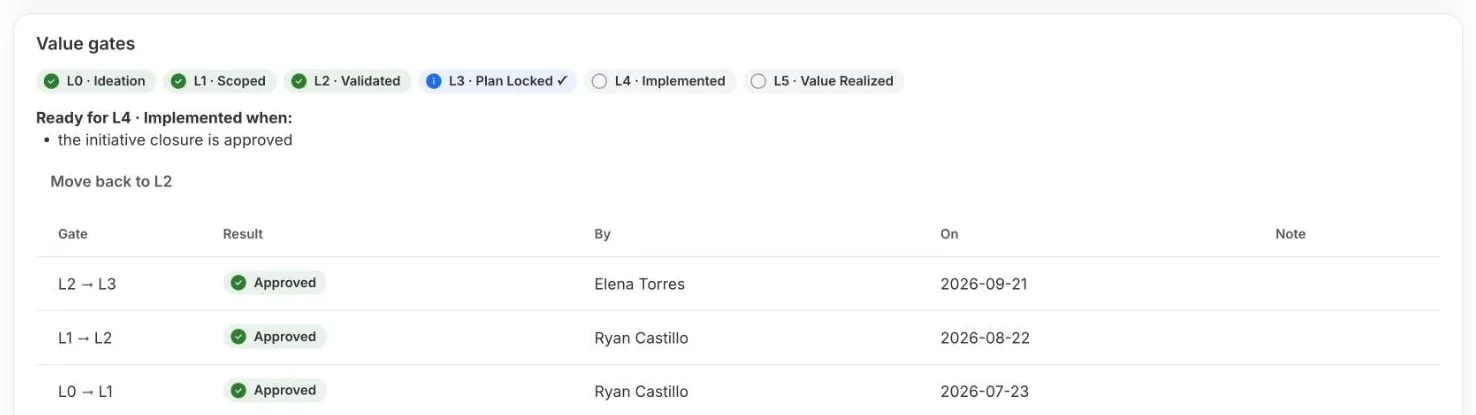
Each initiative shows the gates it has passed, the gate it is at, what it needs for the next one, and who approved each gate and when.
- Gate track and history on every initiative Live
- The plan saved at L3, with the date Live
Who approves each gate
A common setup, taken from the CGC blueprint. Every gate can be changed in configuration.
| Gate | Approvers, all must approve | SLA | Entry checks |
|---|---|---|---|
| L0 Ideation | Workstream lead | 48 hours | Title, workstream, value range, two sentence description |
| L1 Scoped | Workstream lead, TO analyst | 48 hours | Owner named, scope complete, start date and run rate month |
| L2 Validated | Workstream lead, finance partner, plus the CTO when CAPEX is above $250,000 | 48 hours | Profit impact, one off cost, CAPEX phasing, estimate basis, confidence, at least one risk, at least five milestones |
| L3 Plan locked | Workstream sponsor, finance partner, CTRO | 48 hours | Phased estimate, milestones with owners and dates, risks reviewed |
| L4 Implemented | Workstream lead, workstream sponsor, TO lead | 72 hours | All milestones done, each with evidence |
| L5 Value realized | Workstream sponsor, finance partner | 72 hours | Run rate held at plan for three months, confirmed by finance |
TO means transformation office. CTRO means chief transformation officer.
How a gate request moves
- SubmitThe owner asks to move to the next gate from the initiative.
- CheckCGC checks the required fields for that gate first. Nothing incomplete reaches an approver.
- ReviewApprovers review in parallel, each with a deadline.
- DecideApprove, approve with conditions, or return with a comment.
- RecordThe decision is kept in the history. At L3 the plan is saved as the reference.
- Approvals inbox for gate requests Live
- SteerCo batch approvals and Present mode In build
- Approval emails In build
- Server side enforcement of gates and roles In build
Forecast again. Never move the baseline.
After L3 the plan is fixed. Owners update the latest estimate with a comment, and a drop of more than 10% is flagged for the next steering committee. Progress can always be compared with the original commitment.
of the maximum financial benefit is what companies with successful transformations say they captured. The rest captured 37%.
Source: McKinsey, Losing from day one: Why even successful transformations fall short, December 2021of the potential financial benefit of a transformation is lost, on average, in the later stages of executing and sustaining it.
Source: McKinsey, How to implement transformations for long term impact, May 2023What it means for your role
Pick your role to see what changes for you.
Choose a role above. Every role sees the same record, with the view and the decisions that matter to them.
For CEOs and executive sponsors
One number the board can trust
Identified, risk adjusted and realized value against the program target, with the gap in plain sight. Only value your finance partners have confirmed counts as realized.
Decisions, not slides
Escalations from the weekly pulse and gate requests waiting on an approver land on one list. You clear them in the meeting, on the data in front of you.
Value that stays
L5 means the run rate held for three months and finance confirmed it. You see what is real today, apart from what is still a promise.
For CFOs and finance leaders
Finance signs the gates that matter
The finance partner approves at L2 Validated, L3 Plan locked and L5 Value realized. Nothing reaches realized value without them.
Plan, latest estimate and reported, side by side
The plan is saved at L3 and cannot be edited. Owners keep the latest estimate current, and a drop of more than 10% turns the initiative Amber.
Value mapped to the lines it changes In build
Impact lines carry the P&L line they land on, with CAPEX shown as a memo against plant and equipment. These are management estimates, kept apart from the ledger.
For chief transformation officers
A pipeline with real weights
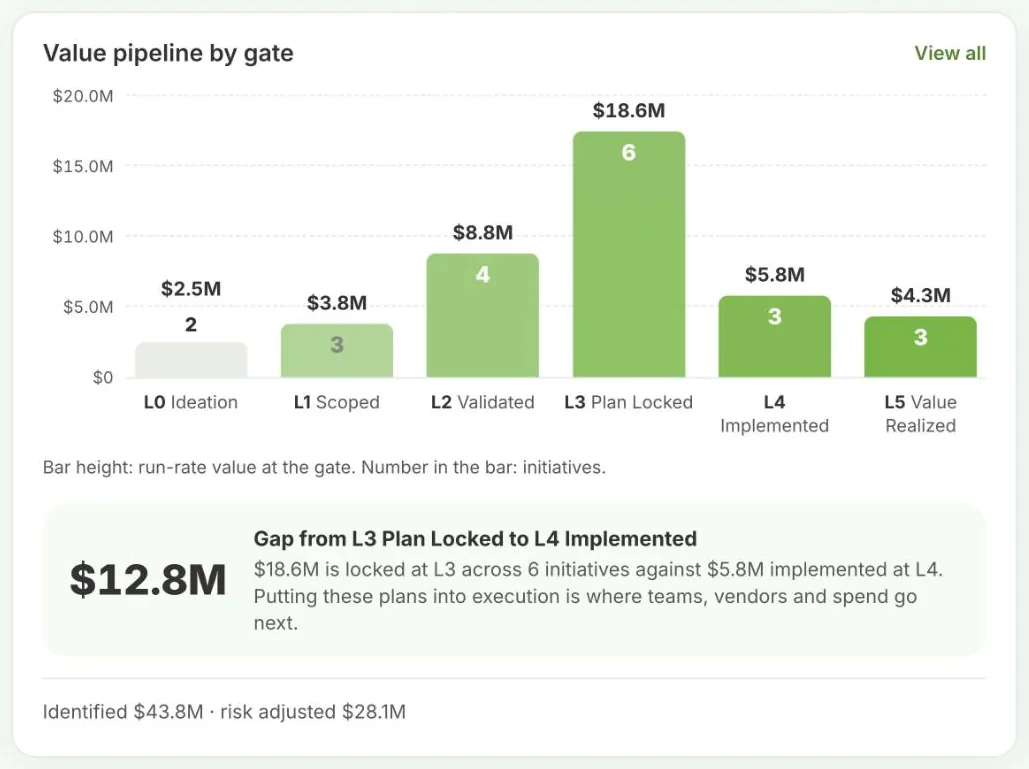
Value at L1 counts 25%, at L2 50%, and from L3 the full amount. The risk adjusted total and the gap to target update as gates are passed.
Gates with named approvers and deadlines
Every listed approver must sign. Approvals have a 48 or 72 hour SLA, and anything past it shows on the dashboard.
A steering committee without slides
Overdue milestones, missing pulses, open escalations and gate requests are counted on the dashboard and open as filtered lists.
For Heads of PMO
One register for every initiative Live
Every initiative sits in one register with its gate, run rate, owner and health, and opens to its business case, benefit lines, milestones and weekly pulse.
Status is a rule, not an opinion Live
Status follows written rules: overdue milestones for schedule, and the latest estimate against the L3 plan for value, with Amber at 10% below plan and Red at 25%.
Keep planning in Project
Import a Microsoft Project file into the initiative's milestones. Your planners keep their tool, and you keep the governance.
Questions
How many gates should we have?
CGC ships with six, L0 to L5, which is common in large transformation programs. You can rename them and change their checks, approvers and SLAs.
What happens when an approval is late?
A reminder goes out at 48 hours. At 72 hours the request is flagged past SLA on the dashboard, and at 96 hours it is raised to the chief transformation officer.
Can we add an approver only for large investments?
Yes. Conditional approvers join a gate when a rule is met, for example the CTO at L2 when CAPEX is above $250,000.
Can a gate be approved by one person?
Each gate is set to need every listed approver or any one of them. Requiring every approver is recommended.
Do not take our word for it. Take Microsoft's.
CGC is listed and transactable on Microsoft Marketplace, co-sell ready with Microsoft, and the subject of a Microsoft partner success story. Centric is a Microsoft Solutions Partner for Data & AI (Azure).
Centric's enterprise-grade platform unifies strategic planning, KPI management, program execution, and governance workflows into a single, secure system of record.

- February 2026Listed on Microsoft MarketplaceCGC goes live on Microsoft Marketplace as a transactable offer.
- May 2026Named in the Microsoft Marketplace blogMicrosoft features CGC among new transactable offers on 26 May 2026.
- October 2026Co-sell ready with MicrosoftMicrosoft sellers can work with Centric on customer purchases.
- November 2026Featured in a Microsoft partner success storyMicrosoft publishes how Centric built CGC into a scalable Marketplace offer, on 13 November 2026.
See it on your own sector's data.
A 30 minute walkthrough, built around a program like yours. No slides, the real product.